
In order to update your bank account details within the employee portal you simply need to enter 'Employee Details' (see here for help). Once in your details page, click 'Bank Accounts' to the left of screen.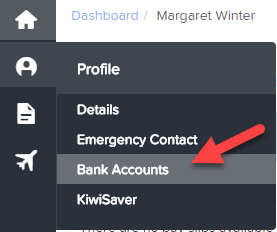
The bank account details screen allows you to control how much of your pay goes into a bank account by specifying a percentage or fixed amount.
Adding a Bank Account
Once you click on 'Bank Account', you will then be required to enter the following details:
- Name: Your first name and surname will pre-populate in this field. You can change this so that it matches the name of the bank account if you so wish.
- Account Number: Enter your account number here. A maximum of 16 digits should be entered here.
- Particulars: This field is voluntary and only relevant if the bank account belongs to a third party that you intend to distribute funds to in the form of a deduction to your net earnings, for eg charitable organisations via a payroll giving deduction. The third party will advise you what value to enter in this field.
- Code: Similar to the 'Particulars' field, this field is only relevant if the bank account belongs to a third party. The third party will advise you what value to enter in this field.
- Pay into this account: You have three options here - (a) a percentage of your pay, (b) a fixed dollar amount or (c) the entire amount. If only one bank account is to be set up, the value here must be "Entire balance".
- Then click "Save".
Deleting Bank Accounts
In order to delete bank account details, you simply click on 'Delete this bank account' if it is displayed in red. If it is in grey, it means it cannot be deleted. Common reasons for this is (a) it is the only bank account recorded for you and so another bank account will need to be added before it can be deleted or (b) the bank account is attached to a recurring deduction and so cannot be deleted until the deduction expires or is deleted. You will need to speak to your payroll administrator to have this changed.
Editing Bank Accounts
You may find that a bank account is greyed out and cannot be edited. This is because your payroll administrator has restricted this setting.
Otherwise, you can simply amend existing bank account details and then click on "Save".