
In order to update your employee details within the employee portal you simply need to click the icon on the left side column within the employee portal.
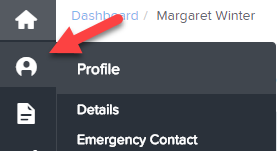
From this next screen, if enabled at a business level, you are able to change details such as:
- Name, Address and Contact Details
- Emergency Contacts - Primary and Secondary Contacts
- Bank Accounts - You can add bank accounts and control how much of your pay goes into each account by specifying a percentage or a fixed amount.
- KiwiSaver - You can edit your KiwiSaver Enrollment Option, as well as adjust the employee contribution percentage
- Time and Attendance kiosk PIN (if configured for access)
Note: In order to update employee details it needs to be enabled by the payroll administrator under business settings.