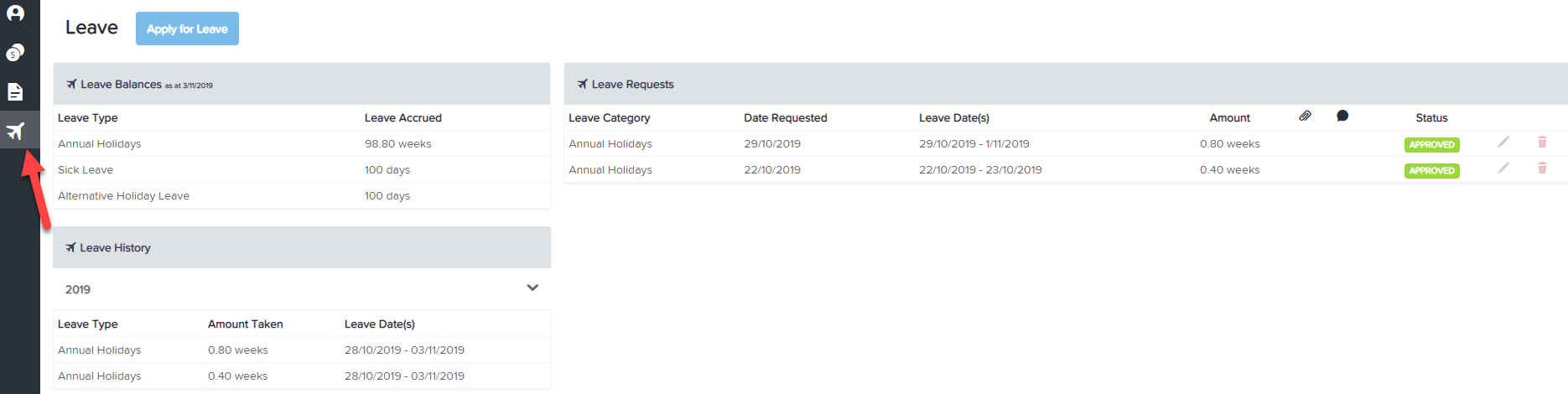
You are able to view your Leave Balance through the Employee Self Service Portal. The "Leave Balances" information is on the main Employee Dashboard and contains the following information:
- Leave Type - Annual holidays, Annual holidays accrued, Sick, Long Service etc
- Leave Accrued - in weeks/days.
NB: If you cannot see the above leave balances, the business settings may be preventing it so you'll need to talk to your employer.
You are able to view your Leave Requests and Leave Balances after you apply for leave. For more information on "Applying for Leave", click here. That screen will show the following information:
- Leave Balances - the same one as on your main dashboard
- Leave Requests - Shows leave category, date requested, first and last day of leave, amount, and status.
- Leave History - Leave type, amount taken, from date and to date.